
ถอดเสียงแม่นยำ
Lattice-2 Flash / Pro รองรับมากกว่า 40 ภาษา
เอนจิน AI บนอุปกรณ์
ถอดเสียงและวิดีโอ สร้างเสียงพูด พร้อมข้อความและคำบรรยายที่มีเวลาตรงแม่นยำบนคอมพิวเตอร์ของคุณ
จ่ายครั้งเดียว ไม่ต้องต่ออายุ
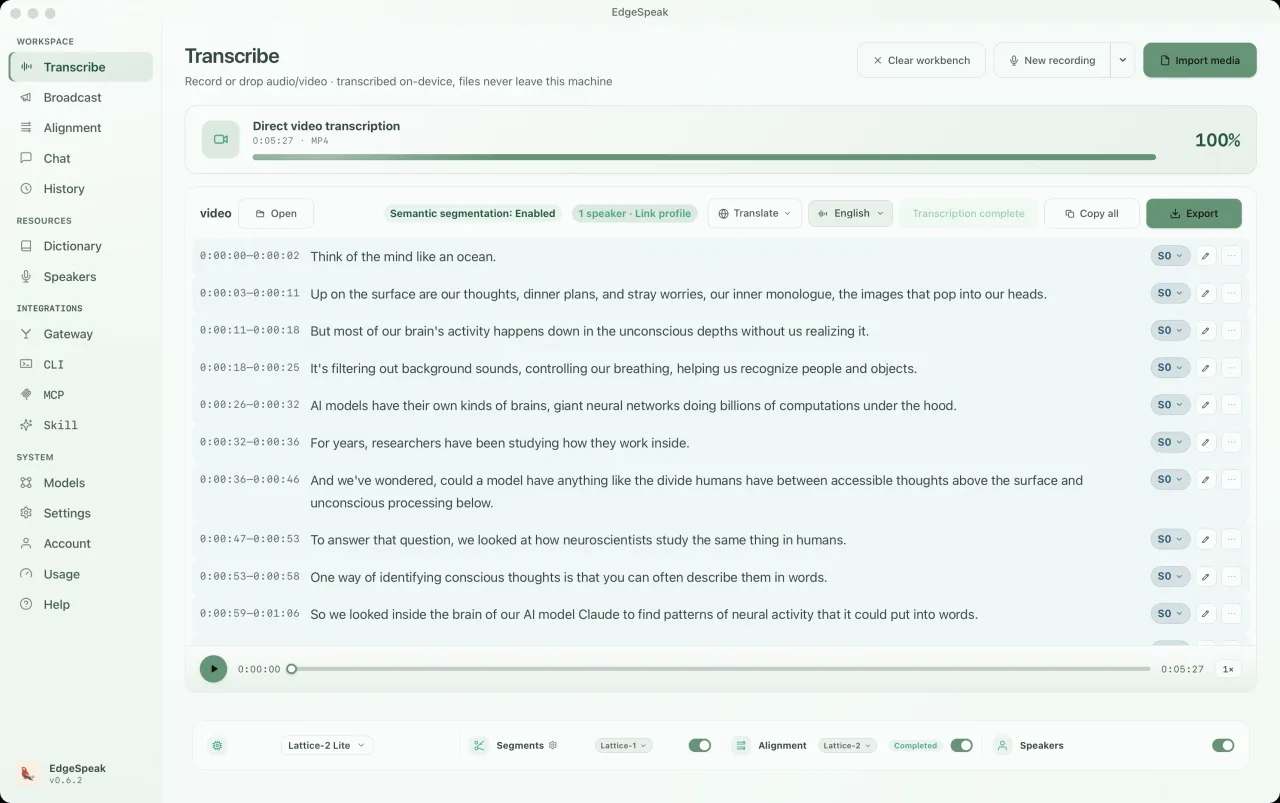
ความเข้าใจและการสร้างเสียง
Lattice-2 Flash / Pro รองรับมากกว่า 40 ภาษา
การสังเคราะห์แบบสตรีมในเครื่องเริ่มเล่นเสียงขณะสร้าง
เวลาระดับคำ พร้อมส่งออก SRT, VTT และคำบรรยายคาราโอเกะ
คุยกับโมเดลในเครื่องด้วยเสียงหรือข้อความ รองรับการปรับบทบาทและการแปลแบบล่ามสด
แอปเดสก์ท็อปจริง
ระบบแช็ตทำงานบนโมเดลในคอมพิวเตอร์ของคุณ สลับระหว่างเสียงและข้อความได้ตลอดเวลา เลือกบทบาท (Persona) ได้ตามต้องการ และทุกบทสนทนาจะบันทึกไว้ในแผงประวัติ
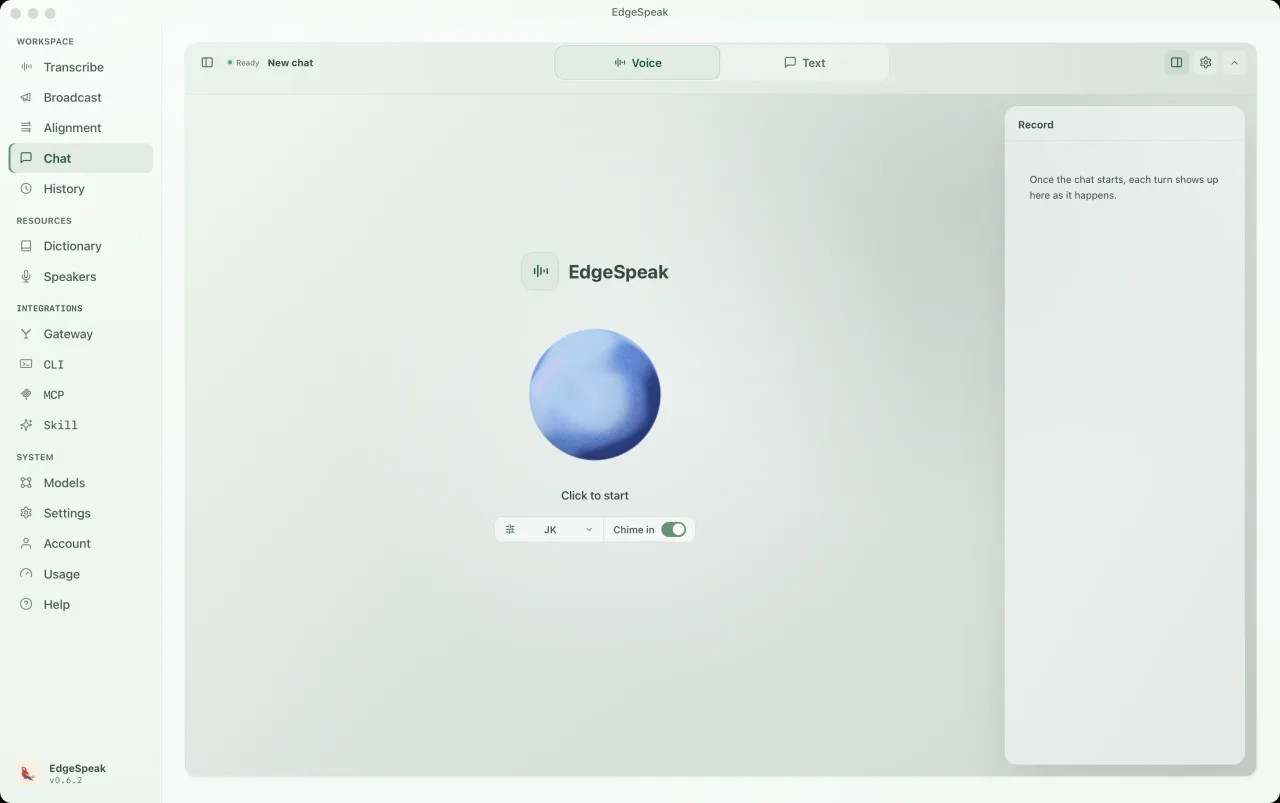
เลือกพรีเซ็ตอย่าง Buddy, เพื่อนคุยด้วยเสียง, ติวเตอร์ภาษา หรือสวมบทบาท หรือเขียนพรอมต์ของคุณเอง มีผลตั้งแต่การตอบกลับครั้งถัดไป
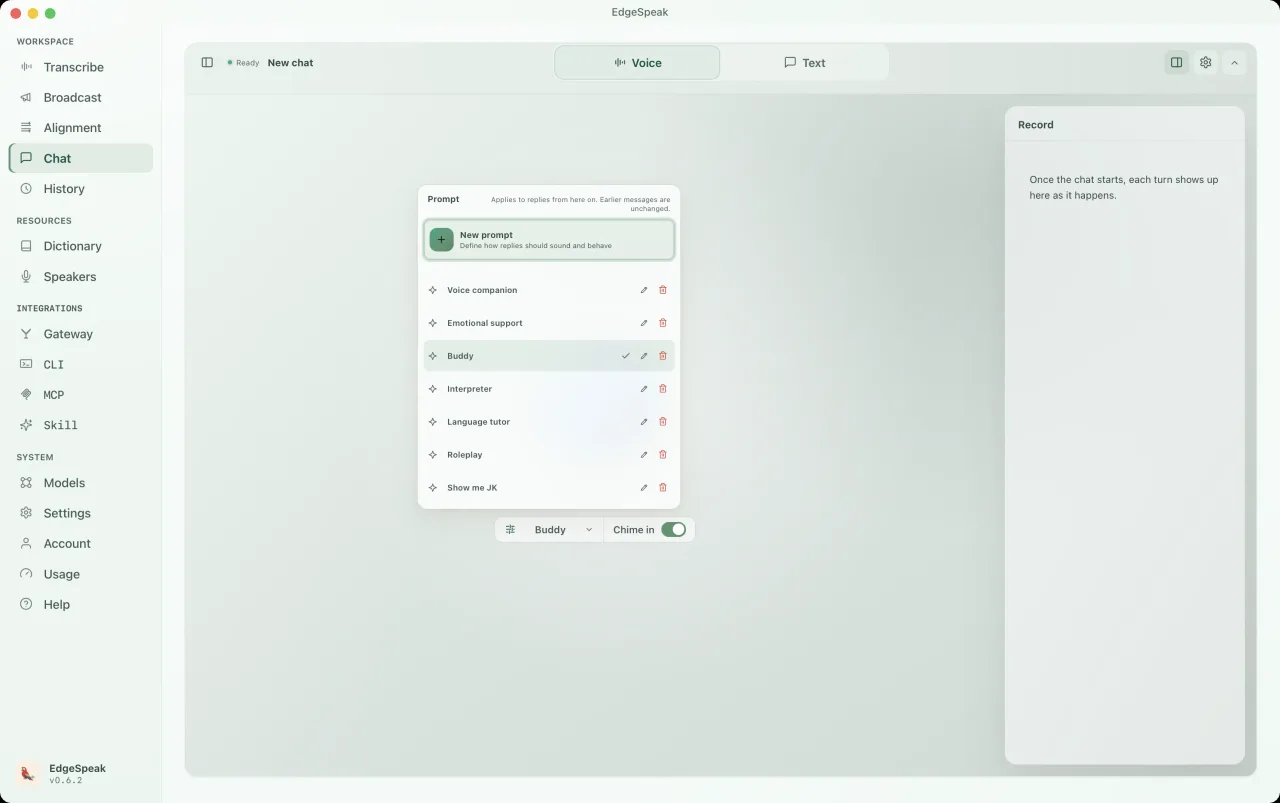
สลับเพอร์โซนาเป็นล่าม เลือกคู่ภาษาและรูปแบบ แล้วเริ่มพูดได้ทันที ข้อความตอบกลับจะถูกบันทึกไว้ในแถบประวัติ

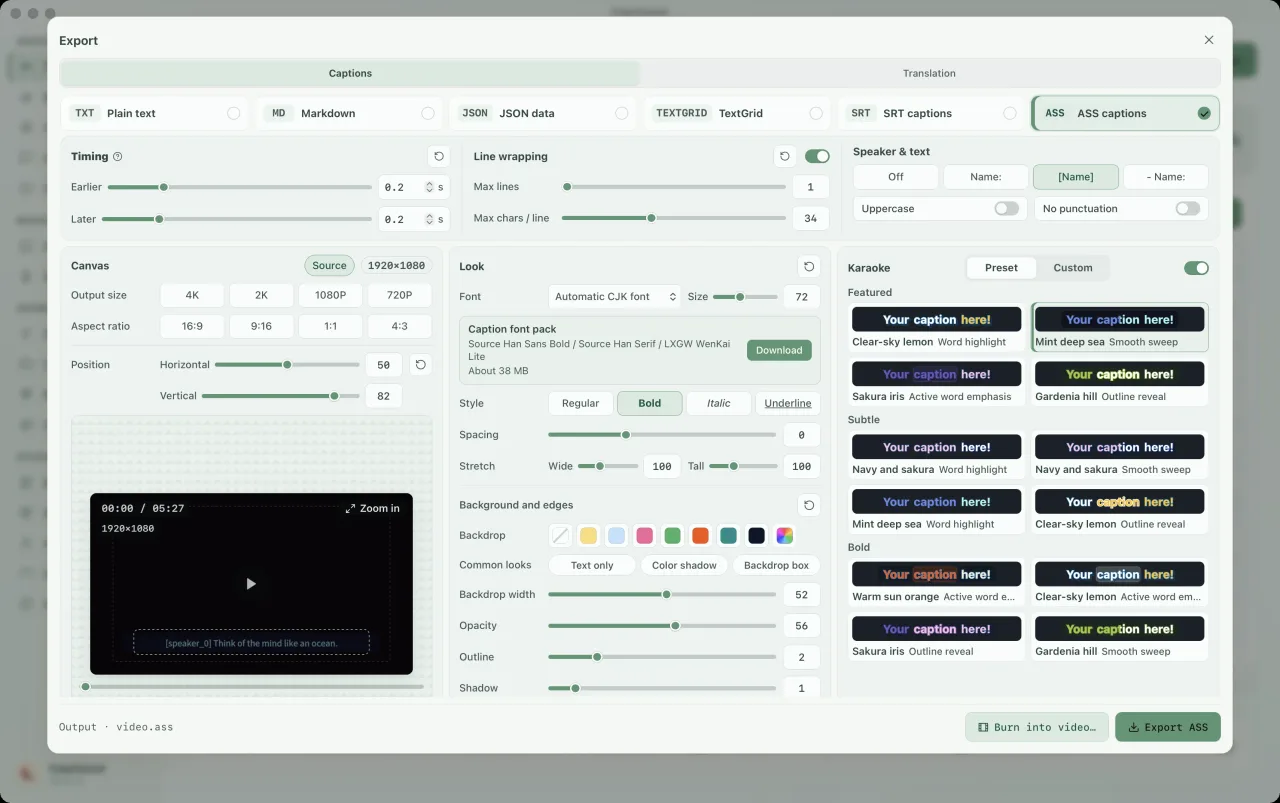
เลือกคำบรรยาย ASS และเปิดคาราโอเกะในแผงส่งออก เลือกรูปแบบไฮไลต์ ปรับแบบอักษร สี และขนาดผืนผ้าใบ แล้วดูตัวอย่างรูปแบบก่อนส่งออก การไฮไลต์ทีละคำต้องมีเวลาประจำแต่ละคำ หากจำเป็นให้จัดแนวเวลาก่อน
CLI และเกตเวย์ในเครื่อง
CLI มีรันไทม์ในเครื่องของตัวเอง ถอดเสียง สร้างข้อความและเสียงพูดได้โดยไม่ต้องเปิดแอปเดสก์ท็อป หรือเชื่อมต่อสคริปต์ MCP และ Agent
ติดตั้งผ่าน Terminal บน macOS หรือ Linux และผ่าน PowerShell บน Windows บน Linux ตัวติดตั้งจะเลือกรุ่น CUDA เมื่อพบไดรเวอร์ NVIDIA หรือสภาพแวดล้อม CUDA หากไม่พบจะติดตั้งรุ่น CPU และเพิ่ม --device cuda หรือ --device cpu เพื่อระบุเองได้ ส่วนบน Windows เลือกติดตั้ง CUDA ได้ตามต้องการ
macOS / Linux · Terminal
curl -fsSL https://edgespeak.com/install.sh | sh
Windows · PowerShell
irm https://edgespeak.com/install.ps1 | iex
เกตเวย์ AI ในเครื่อง
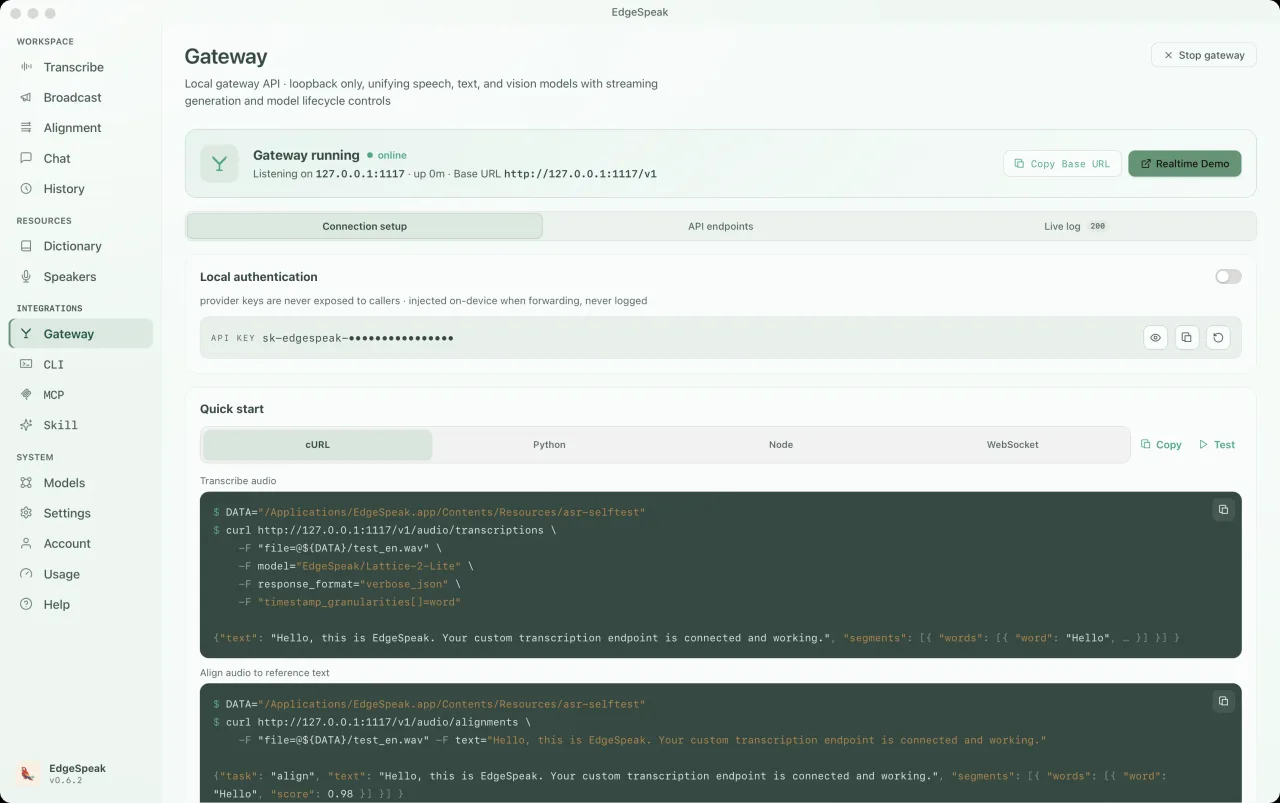
เชื่อมต่อ OpenClaw, Claude Code และ Cursor ผ่าน API ที่เข้ากันได้กับ OpenAI การถอดเสียง การสังเคราะห์เสียง Chat Completions และ Realtime ใช้เกตเวย์ในเครื่องเดียวกัน
สนทนาแบบเรียลไทม์พร้อมรองรับการพูดแทรก โหลดโมเดลภาษาในเครื่องก่อนเริ่ม
ws://127.0.0.1:1117/v1/realtimePOST /v1/audio/transcriptionslocalhost:1117curl http://127.0.0.1:1117/v1/audio/transcriptions \ -H "Authorization: Bearer sk-edgespeak-..." \ -F file=@meeting.m4a \ -F model="lattice-2-flash"
EdgeSpeak Skills สอนให้ Claude Code, Cursor และเอเจนต์ที่รองรับ Skills ถอดเสียงบนอุปกรณ์ผ่าน CLI โอเพนซอร์สบน GitHub
npx skills add lattifai/EdgeSpeak
LOCAL LM + VLM · 0.6B — 27B
มีโมเดล Qwen และ Gemma ขนาด 0.6B–27B ประมวลผลข้อความและภาพผ่าน Chat Completions / Responses โดยข้อมูลเข้าและผลลัพธ์อยู่บนอุปกรณ์
ข้อความ + รูปภาพ · ใช้ร่วมกับ OpenAI · ภายในเครื่องก่อน
นำเข้าโมเดล GGUF ที่เข้ากันได้ ความสามารถด้านภาพต้องใช้ไฟล์โปรเจกเตอร์ที่ตรงกัน การเลือกโมเดลขึ้นอยู่กับหน่วยความจำและฮาร์ดแวร์

Qwen/Qwen3-0.6B0.6B0.4 GBQwen/Qwen3.5-0.8B0.8B0.5 GBQwen/Qwen3.5-2B2B1.3 GB
google/gemma-4-E2B-it2B3.1 GBQwen/Qwen3.5-4Bค่าเริ่มต้น4B2.7 GBgoogle/gemma-4-E4B-it4B5.0 GBQwen/Qwen3.5-9B9B5.7 GBgoogle/gemma-4-12B-it12B7.1 GBQwen/Qwen3.6-27B27B16.8 GBข้อความ + รูปภาพ · ใช้ร่วมกับ OpenAI · ภายในเครื่องก่อน
Choose by workflow
The right option depends on where media can go, how much workflow you want ready-made, and who should maintain the speech stack.
| Choose by workflow | EdgeSpeak | Cloud transcription | Self-managed local model |
|---|---|---|---|
| Source media | Stays on this device | Uploaded to a remote service | Stays on the machine you configure |
| Review workflow | Desktop playback, transcript, and export | Depends on the provider | You build the review surface |
| Tools and agents | Local CLI and OpenAI-compatible gateway | Hosted API | You build and maintain the integration |
| Operations | Install the app and local models | Manage an account, API keys, and network access | Maintain the runtime, models, and dependencies |
Workflows
สำรวจไฟล์ส่วนตัว การถอดเสียงและวิดีโอในเครื่อง agent automation และตัวเลือกในเครื่องเทียบกับ cloud
Keep source media on-device and generate the transcript locally.
Review with playback, then export text or subtitles.
Install the EdgeSpeak Skill and let agents call the local CLI.
Choose by media location, processing scale, and integration path.
ความเป็นส่วนตัว
เสียง วิดีโอ ภาพ บทสนทนา และข้อความที่สร้างจะอยู่บนอุปกรณ์ เว้นแต่คุณจะส่งออก อัปโหลด หรือแชร์เอง
ให้คอมพิวเตอร์เข้าใจการประชุม สัมภาษณ์ และวิดีโอได้เอง
ส่งออกข้อความหรือซับไตเติล หรือให้เครื่องมืออื่นใช้ transcript ที่เสร็จแล้วต่อ
FAQ
การประมวลผลในเครื่อง แพลตฟอร์มที่รองรับ โมเดล และแผนสมาชิก อธิบายชัดก่อนซื้อ
See all questionsImported media and generated transcripts stay on your device unless you export, upload, or share them yourself.
EdgeSpeak is available for Apple Silicon Macs with macOS 14.0 or later. A Windows 10/11 x64 version is also available and supports in-app automatic updates.
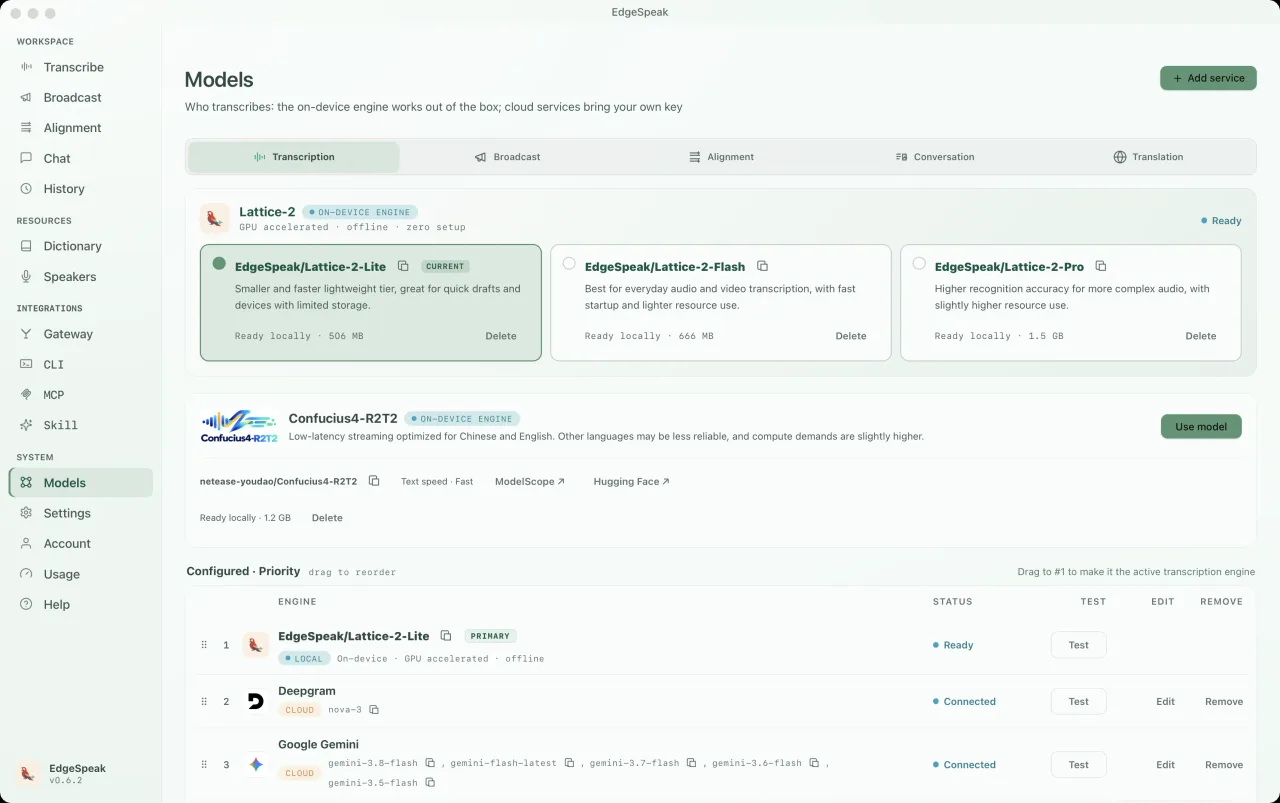
Flash is tuned for faster everyday transcription. Pro raises the accuracy ceiling for harder audio and uses more local resources.
Yes. The bundled CLI and local OpenAI-compatible gateway let trusted tools on the same computer call the local speech engine.
ราคา
หรือลองใช้ฟรีก่อน ไม่ต้องใช้บัตรเครดิต
คิดเงินเฉพาะอินพุต เอาต์พุตฟรี
สมัครสมาชิกเสียงจากชุมชน
แชร์ workflow จริง ความต้องการเชื่อมต่อ agent และไอเดียผลิตภัณฑ์บน Discord
ความคิดเห็นของคุณเข้าสู่การพัฒนาผลิตภัณฑ์โดยตรง
เอนจิน AI บนอุปกรณ์
ถอดเสียงและวิดีโอ สร้างเสียงพูด พร้อมข้อความและคำบรรยายที่มีเวลาตรงแม่นยำบนคอมพิวเตอร์ของคุณ