
Local Gateway API
Call the EdgeSpeak API locally or from another trusted machine.
API reading path
Each guide contains requests, example outputs, prerequisites and links back to this index.
- Transcription and speakers
- Text processing
- Speech and voice library
- Forced alignment
- Language and vision
- Realtime sessions
- Models and service
- MCP tools and HTTP transport for agent integrations; CLI for terminal workflows.
APIs that take a content language share one set of language codes; see Languages for the per-API rules. Track compatibility and migrations in the API changelog. It is updated for API changes independently of desktop releases.
Quickstart
Choose one way to start the service, then use its base URL in your client.
| Service | Start it | Default base URL |
|---|---|---|
| Desktop app | Open the app and confirm the Gateway is running. | http://127.0.0.1:1117/v1 |
| CLI | Install the CLI, then run edgespeak-cli serve. No desktop app is needed. | http://127.0.0.1:1118/v1 |
- CLI: runs in the foreground. Leave the terminal open and call the API from another terminal; press
Ctrl-Cto stop. WithEDGESPEAK_API_KEYunset, authentication is off by default; a non-empty value requires verifying that key at startup. Authentication commands. - Desktop app: Local authentication is off on fresh installs. Enable it in the app when needed.
- Before inference: sign in or activate, then download and load a model.
The example below connects to the desktop gateway. For a CLI service, change the base URL port to 1118.
export EDGESPEAK_BASE_URL=http://127.0.0.1:1117/v1  # CLI: http://127.0.0.1:1118/v1

curl "$EDGESPEAK_BASE_URL/models"
Example conventions:
| Item | Details |
|---|---|
| Shell and tools | Bash/zsh (Windows: WSL or Git Bash) and curl with --fail-with-body. jq and Python 3 are noted where needed. Keep the same shell environment for later commands. |
| Example switch | Choose the service’s authentication mode above to include or omit key setup and headers. |
| Base URL | EDGESPEAK_BASE_URL includes /v1 and has no trailing slash. |
| Headers | Use Authorization: Bearer or x-api-key: $EDGESPEAK_API_KEY. |
| Key source | See API Key storage and rotation. |
| Example content | Replace sample files and model IDs with your own. Responses are illustrative, with excerpts or transformed output explicitly identified. |
Check connectivity with GET /health, then inspect the catalog and prepare a model, and choose an endpoint from the index below.
Every endpoint at a glance
The gateway provides the HTTP endpoints below, health check aliases, a Realtime WebSocket, and an MCP transport. /mcp sits at the server root, outside /v1.
Models and service · Text processing · Transcription and speakers · Forced alignment · Speech and voice library · Language and vision · Realtime sessions · MCP tools
Models and service
| Method and path | Guide and example |
|---|---|
GET /health | Check service health |
GET /v1/health | Check service health |
GET /v1/usage | Inspect usage |
GET /v1/models | Discover models and capabilities |
POST /v1/models/download | Start a model download |
GET /v1/models/downloads | Check download progress |
POST /v1/models/download/cancel | Cancel an active download |
POST /v1/models/load | Load a local model |
GET /v1/models/running | Inspect running models |
POST /v1/models/unload | Unload a model |
Text processing
| Method and path | Guide and example |
|---|---|
POST /v1/text/segmentations | Segment sentences |
POST /v1/text/normalizations | Normalize text: TN and ITN |
Transcription and speakers
| Method and path | Guide and example |
|---|---|
POST /v1/audio/transcriptions | Transcribe an audio file |
POST /v1/speaker/diarizations | Get a speaker activity timeline |
POST /v1/speaker/embeddings | Extract speaker embeddings |
POST /v1/speaker/similarity | Compare the two embeddings |
Forced alignment
| Method and path | Guide and example |
|---|---|
POST /v1/audio/alignments | Align known text with audio |
Speech and voice library
| Method and path | Guide and example |
|---|---|
GET /v1/audio/voices | List voices and choose a compatible pair |
POST /v1/audio/speech | Generate speech as WAV |
GET /v1/audio/speech/examples | Find model-specific speech examples |
POST /v1/audio/voices | Create a reusable user voice |
DELETE /v1/audio/voices/:voice_id | Delete a user voice |
Language and vision
| Method and path | Guide and example |
|---|---|
POST /v1/responses | Generate with Responses |
POST /v1/chat/completions | Generate with Chat Completions |
POST /v1/messages | Generate with Messages |
POST /v1/tokenize | Tokenize text |
Realtime sessions
| Method and path | Guide and example |
|---|---|
WS /v1/realtime | Run one complete text exchange |
MCP tools
| Method and path | Guide and example |
|---|---|
POST /mcp | Initialize and call a tool |
API Key storage and rotation
The API Key authenticates API requests. The License Key activates the software; they are separate keys.
Desktop app. On first launch the app generates sk-edgespeak- followed by 64 hexadecimal characters and saves it in the app data directory, on macOS ~/Library/Application Support/EdgeSpeak/gateway_api_key. Open Local gateway → Local authentication to switch authentication on or off, read the key, or regenerate it. Changes apply immediately without a restart.
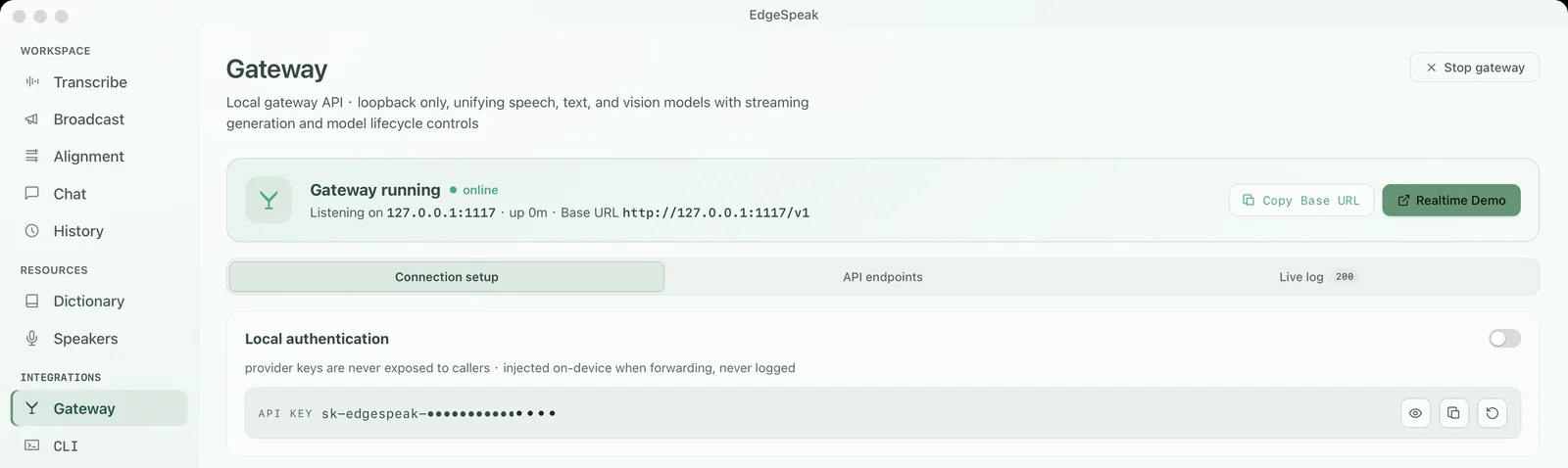
CLI. Client commands such as transcribe, align and speech take the key from --api-key, then EDGESPEAK_API_KEY, then the desktop app's gateway_api_key file, so they need no configuration while the app is running. edgespeak-cli serve reads the key only from EDGESPEAK_API_KEY: it has no --api-key option and never generates, saves or rotates one. On the default loopback address 127.0.0.1:1118, leaving the variable unset means no authentication. A non-loopback listener requires the variable or an explicit --allow-unauthenticated. Startup prints EdgeSpeak service authentication: … on stderr, never the key itself. To change the key, change the variable and restart.
EDGESPEAK_API_KEY="your-long-random-secret" edgespeak-cli serve --host 0.0.0.0 --allow-remotesk-edgespeak-… is illustrative; use the full key in requests. Replacing a key does not retroactively revoke accepted requests or established WebSocket sessions; to terminate existing sessions, stop the service. See CLI key handling.
Call the API from another machine
Run the headless service on a machine with the required CPU or GPU resources and installed local models, without installing or running the desktop app. The desktop gateway accepts only local calls; to allow access from other machines, configure edgespeak-cli serve to explicitly listen on a LAN or private VPN address. By default, the CLI service listens only on http://127.0.0.1:1118/v1.
The following remote setup uses authentication in both display modes. On the service host (the machine running the service), load a long random key from protected secret storage, then start the service:
export EDGESPEAK_API_KEY="your-long-random-secret"
edgespeak-cli serve --host 0.0.0.0 --port 1118 --allow-remote
When listening on a non-loopback address, the service refuses to start unless you pass --allow-remote; it also requires a non-empty EDGESPEAK_API_KEY (unless you explicitly pass --allow-unauthenticated). Disable remote authentication only on an isolated test network.
On the client (the machine making the request), replace 192.168.1.50 with the service host's actual LAN or VPN address and use the same key:
export EDGESPEAK_BASE_URL=http://192.168.1.50:1118/v1
export EDGESPEAK_API_KEY="your-long-random-secret"

curl "$EDGESPEAK_BASE_URL/models" \
  -H "Authorization: Bearer $EDGESPEAK_API_KEY"
0.0.0.0 is only a server listening address; never put it in the client URL. If EdgeSpeak can identify a single usable network interface, startup output includes a copyable EdgeSpeak service network URL. The service host handles model downloads and management, inference, and License validation; audio, text, images, and response data travel between the two machines during calls.
The headless service shares the same gateway implementation with the desktop app, with identical endpoint paths and request formats; only the base URL and API Key differ. Two inputs are desktop-only: streaming transcription (stream=true) returns 400 on the headless service, and local file paths are not supported. Because the headless service only receives uploaded data bytes, pass text instead of text_path for alignments, and pass segments[] directly instead of file for segmentation.
The headless service provides HTTP and does not include HTTPS. Use it only on a trusted LAN or private VPN, and use the service host's firewall to restrict TCP port 1118 to trusted sources. Alternatively, keep the default loopback listener and connect from another machine through an SSH tunnel:
ssh -L 1118:127.0.0.1:1118 user@edgespeak-hostIf the client runs in a browser, add the page origin with --allow-origin https://your-app.example. If an HTTPS reverse proxy rewrites the Host header to a domain, add that domain to the allowlist with --allow-host gateway.example; clients calling directly by IP address do not need --allow-host. See the CLI service guide for installation and startup instructions.
Audio and text
Transcribe uploaded media, align known transcripts, semantically segment text, synthesize speech, and manage reusable local voices. Transcription supports json, verbose_json, text, diarized_json, and JSON-mode SSE streaming; timestamp granularities are available in verbose_json and diarized output. See the endpoint index for paths.
Audio request parameters
Use direct parameter names: snake_case in JSON and multipart, and hyphens in HTTP headers, without a product prefix or wrapper. Response metadata extensions retain their existing format.
| Parameter | Description |
|---|---|
| Speech JSON | Put language, seed, sample_rate and model-supported sampling controls at the top level. |
sample_rate | Omit for native-rate output. HTTP streams by default; desktop accepts an explicit native rate only and returns 400 for streaming resampling; Headless services or standalone hosts reject explicit values. |
| Realtime | Use session.input_audio_mode and session.reasoning_effort. |
Transcription and alignment share these multipart fields. Omitted values inherit service settings; supplying length or margin fields requests semantic processing.
| Parameter | Description |
|---|---|
semantic_sentence_enabled | Controls semantic processing; explicitly setting it to false conflicts with length or margin fields and returns 400. |
min_chars / max_chars | Sentence character limits with factory defaults of 12 and 42. Length constraints are off by default; supplying either length field enables them. |
start_margin / end_margin | Seconds; both factory margins are 0.2 s. |
| Parameter | Description |
|---|---|
audio_track | Alignment only: zero-based decodable audio track. |
audio_channel | Alignment only: mix or a zero-based channel index. |
candidates | Transcription with N-best support: 1 is normal output; 2–8 require non-streaming verbose_json without word timestamps. |
Conflicting repeated values of these three parameters return 400.
Transcription can control word timestamps directly via word_timestamp_enabled. The former product-prefixed request fields are retired. The standalone segmentation endpoint /v1/text/segmentations always performs segmentation and does not accept semantic_sentence_enabled; see its inputs and paragraph mode below.
Alignment and text normalization
POST /v1/audio/alignments · multipart
| Parameter | Description |
|---|---|
file | Upload the audio file. |
text / text_path | Supply transcript text to align. For input differences between the desktop gateway and the Headless service, see Call the API from another machine. |
model | Optional alignment model. For defaults and language coverage, see alignment requests. Passing a transcription or speech model returns 400 model_capability_unsupported; passing a non-existent model ID returns 404 model_not_found; both carry param: "model". |
language | Optional language hint. For the three-way meaning of omitting it, sending a language code, and sending und, see alignment requests; for codes and model coverage, see Languages. |
start / end | Clipping range, supplied together in seconds: 0 ≤ start < end, within the audio duration. |
search_effort | Search range: standard (default), extended (wider, slower, uses more memory) or auto (retries once with extended when the service recommends it). Other values return 400 with param: "search_effort". See alignment failures. |
Timestamps remain relative to the original audio; duration is the full media duration, and usage.seconds measures the actual processed window.
Repeat protected_terms[], or pass a JSON array in protected_terms. text_normalization is a JSON string inside multipart:
curl "$EDGESPEAK_BASE_URL/audio/alignments" \
  -F model=EdgeSpeak/Lattice-2 \
  -F file=@meeting.m4a -F text="The total is 42 dollars." -F language=en \
-F 'text_normalization={"enabled":true,"top_k":8}'| Parameter | Description |
|---|---|
enabled | Enabled by default when omitting the entire text_normalization field; set to {"enabled":false} or an empty object to disable. |
top_k | Candidate count; default 8, range 1–16. |
classes | Restricts normalization categories. |
apply_dictionary / dictionary_ids | apply_dictionary defaults to false; set to true to apply dictionaries, optionally restricted by dictionary_ids. |
pins | Choose a region candidate with {source_start_byte, source_end_byte, rank}. Ranges refer to the original UTF-8 transcript; rank:null preserves the source. |
When text normalization is disabled, do not pass top_k, classes, or non-empty pins. See the JSON contract for response language, normalization_regions, and word-level provenance.
Send the progress: 1 header for an NDJSON alignment progress stream. Ordinary requests return one JSON response.
Sentence and paragraph segmentation
POST /v1/text/segmentations accepts JSON. Choose plain text or timed segments[]; the desktop gateway also accepts file pointing to an exported Transcript JSON file. On the Headless service, pass the JSON content directly. A complete exported object may include its task and summary text alongside segments[].
The default sentence threshold is 0.35. Pass paragraph_threshold to enable paragraph segmentation: each returned segments[] item is a paragraph containing one or more sentences, and the top-level text joins paragraphs with \n\n (a blank line).
curl "$EDGESPEAK_BASE_URL/text/segmentations" \
  -H "Content-Type: application/json" \
-d '{"text":"First sentence. Second sentence. Now let us discuss another topic.","threshold":0.35,"paragraph_threshold":0.5}'| Parameter | Description |
|---|---|
threshold | Sentence threshold; default 0.35, finite value in 0–1. |
paragraph_threshold | Pass to enable native model paragraph boundaries; finite value in 0–1, at least threshold. Omit for sentences. |
| Paragraph input | Plain text only. Combining with segments[], Transcript file, length or margin fields returns 400. |
| Paragraph output | Disables inherited length and margin processing; no timestamps or speakers are generated. |
paragraph_threshold and sentence-length or margin fields may also be supplied in options; matching top-level fields take precedence. The CLI equivalent is segment --paragraph-threshold 0.5.
Standalone text normalization
POST /v1/text/normalizations converts written forms to spoken forms (mode:"tn"), or spoken forms to written forms (mode:"itn"), without audio. The endpoint rejects unknown request fields, and text normalization does not consume audio-duration quota.
language is required; see Languages for the supported list and und. For supported languages and categories, read the response metadata on the Skylark entry in /v1/models: x_edgespeak.normalization.languages_by_mode and classes_by_language.
See the parameter table, complete paragraph input, TN/ITN results and span explanation.
Speech and voices
POST /v1/audio/speech · JSON
| Parameter | Description |
|---|---|
model / voice | Required; obtain voice IDs from /v1/audio/voices. |
input / segments[] | Supply input or non-empty segments[]. Segments share the top-level model and can individually configure input, voice, instructions, disable_style, speed, and language. |
response_format | Use wav. |
stream_format | Default audio streams audio bytes; sse returns speech.audio.delta and speech.audio.done. |
The following controls go at the JSON top level; use only those supported by your model:
| Parameter | Description |
|---|---|
| Language / randomness | language, seed |
| Sampling / generation | guidance_scale, inference_steps, temperature, top_p, top_k, repetition_penalty |
| Style / retry / cloning | instructions, disable_style, clone_mode, retry_badcase, clone_recipe; for the first three see Style instructions, clone modes, and voice design |
| Pronunciation / control | user_marks, phonetic_spans, control_policy |
If the selected model does not support the requested language, the request returns HTTP 422 language_unsupported; switch to a model that supports it. Each model's languages are listed in Languages. If the model does not accept a parameter combination, the request returns HTTP 400 bad_request. Both require changing the request, so retrying it unchanged will not succeed. HTTP 500 speech_failed means local synthesis itself failed.
GET /v1/audio/speech/examples provides model-specific speech examples, filterable by model, mode, language, id, and recipe. Catalog fields features, instruction, and x_edgespeak.output_audio.sample_rate describe capabilities and native sample rate.
For the POST /v1/audio/voices multipart parameters, the audio_sample size limit and the language default, see Create a reusable user voice.
Speakers
Use diarized_json for speaker-aware transcripts, or call POST /v1/speaker/diarizations for a speaker activity timeline alone. The API also supports extracting speaker embeddings and calculating cosine similarity for local matching. num_speakers is only an optional clustering hint, not an identity claim; speaker labels identify clusters within that audio. Speaker endpoints accept uploaded audio bytes rather than arbitrary local paths.
For parameters plus request and response examples, see Get a speaker activity timeline. For how CLI transcribe --diarize maps onto these endpoints, see API reuse.
Realtime API
Connect over WebSocket for real-time transcription sessions, or a full transcription → language model → speech session. Send session.update before audio, then append base64-encoded PCM16LE mono audio frames continuously. Server-side clients can authenticate with standard headers; when gateway authentication is enabled, browser WebSocket clients add the openai-insecure-api-key.<KEY> subprotocol alongside realtime. The switch above also updates this connection example. Local language models must be preloaded before Realtime use.
const ws = new WebSocket(
  "ws://127.0.0.1:1117/v1/realtime",
  ["realtime"]
);
For the event sequence, session.audio.input.format, session.input_audio_mode, the audio output sample rate and manual versus server_vad committing, see Realtime sessions.
Language and vision APIs
Choose the compatibility surface that matches your client: OpenAI Responses, Chat Completions, Anthropic Messages, or the tokenization endpoint. Not every model supports every endpoint; read supported_endpoints from /v1/models, and check execution_location. Inference and data for local models remain on-device; configured remote models receive forwarded requests.
See the endpoint index for paths, and Language and vision for request and response examples for all four endpoints.
Native video input
POST /v1/chat/completions accepts input_video for installed local multimodal models on macOS and Linux builds with native video support. The desktop gateway and Headless service use the same model-specific preprocessing. Realtime WebSocket sessions do not accept input_video; image events there are still images, not a continuous video stream.
EdgeSpeak selects the sampling rate from the active model's catalog entry or imported-repository metadata. It is not a per-request field or a Server flag:
| Local model family | Sampling rate | Reference preprocessing |
|---|---|---|
| Qwen 3.5 / Qwen 3.6 | 2 FPS | Qwen examples use fps=2.0 with frame sampling enabled |
| Gemma 4 | 1 FPS | Gemma documents video capacity at 1 FPS |
These values follow the model publishers' reference preprocessing rather than the source video's native frame rate. Switching model families restarts the local worker with the matching value. See the Qwen 3.5, Qwen 3.6, and Gemma 4 model documentation.
When the desktop app imports a GGUF repository from Hugging Face or ModelScope, it makes a best-effort read of root-level config.json, tokenizer_config.json, and processor_config.json. A detected video_processor.fps becomes the recommendation; when metadata is absent, known Qwen and Gemma families use the table above, and other repositories containing an mmproj file default to 1 FPS. If config.json declares a vision module but lacks a usable mmproj, the UI displays a warning rather than mistakenly treating it as a runnable vision model. Users can change this to 1, 2, 4, or 8 FPS under Models → Generation settings. More sampled frames generally improve temporal coverage, but consume more visual tokens, context, memory, and processing time.
Pass the base64 encoding of the video file bytes in the Chat Completions content item:
{
  "model": "Qwen/Qwen3.5-4B",
  "messages": [
    {
      "role": "user",
      "content": [
        { "type": "text", "text": "Summarize this video in chronological order." },
        { "type": "input_video", "input_video": { "data": "<base64 MP4 bytes>" } }
      ]
    }
  ]
}
Video decoding requires both ffmpeg and ffprobe to be available on the service machine. EdgeSpeak does not bundle either tool; install ffmpeg with Homebrew on macOS or via your system package manager on Linux. The complete JSON request is limited to 512 MiB, and base64 increases the source file size by roughly one third, so use short, appropriately sized videos.
Context window
Input text, conversation history, visual tokens produced from images or sampled video frames, and model output all share the same context budget. A larger context accommodates more history or video content, but allocates a larger KV cache in RAM or VRAM; a smaller context leaves more memory for the model and other workloads, but requests reach the length limit sooner.
In the desktop app, open Models → Generation settings → Context length on a local model card. The default automatic value is 8K, or choose from 4K up to the model's supported limit. Catalog models use their catalog limit; models imported from Hugging Face or ModelScope inspect max_position_embeddings (including nested text/language configs) or model_max_length, followed by known model family limits, falling back to 262K as a selectable ceiling if all are absent. Settings are saved per model; saving unloads the current local model, and the next request reloads the worker with the new context length.
Headless Server has an independent startup setting and does not read desktop preferences. Pass --context-tokens at startup; the default is 8192 tokens, the accepted range is 512–262144, and the value should not exceed the active model's supported limit. Restart the headless service process after making changes.
edgespeak-cli serve --context-tokens 32768Model discovery and lifecycle
Retrieve canonical model IDs via /v1/models, inspect running models, and explicitly load or unload local language models to control download state and memory. You can start a download, poll its progress, and cancel it.
See the endpoint index for paths, and Models and service for catalog fields and lifecycle request and response examples.
MCP
For agents, stdio through edgespeak-cli mcp is the recommended transport. POST /mcp sits at the server root, outside /v1.
For the transport comparison, authentication and an HTTP call example, see MCP setup.
Several tools follow the same shape as their HTTP endpoints:
| Tool | Shared with the HTTP endpoint |
|---|---|
edgespeak_align | result carries task (always align), text (the request text), segments, and usage, shaped like POST /v1/audio/alignments: split by the sentence-segmentation preference, or one segment with the full text when segmentation is off. The top-level words stays and equals segments[].words concatenated in order. |
edgespeak_create_speech | Optional instructions, disable_style (true cannot be combined with a non-empty instructions), and clone_mode (quick / ultimate); voice accepts builtin:design. See Style instructions, clone modes, and voice design. |
edgespeak_create_response | Optional translation, same shape as the top-level translation on /v1/responses (target_language, language_pair, source_language, style). See Set the translation direction. |
Errors, browser access, and security
License, quota, authentication, model-readiness, and busy-runtime failures all return structured error responses. Non-browser clients without an Origin header can access the API normally, but Host is still verified. Browser requests permit loopback origins by default; to allow trusted non-loopback origins and proxy hosts, explicitly add them to the allowlist using environment variables. Never expose long-lived API keys in public frontend code.
401  invalid or missing API key
403  host or origin is not allowed
413  request body too large (JSON 512 MiB; transcription / alignment upload 16 GiB)
503  model_downloading              # honor Retry-After

EDGESPEAK_GATEWAY_PORT=1117
EDGESPEAK_GATEWAY_ALLOWED_ORIGINS=https://app.example.com
EDGESPEAK_GATEWAY_ALLOWED_HOSTS=proxy.example.com
Read and handle an error
When the service is authorized and ready, the following malformed request returns 400. -i displays both the HTTP status and the response body.
curl -i "$EDGESPEAK_BASE_URL/text/segmentations" \
  -H "Content-Type: application/json" \
  -d '{"text":"Hello world.","threshold":2}'
Example response body (HTTP 400):
{"error":{"message":"'threshold' must be within [0, 1]","type":"invalid_request_error","code":"bad_request","param":"threshold"}}Base program logic on error.code and find the input field with error.param. A 400 means the parameters need fixing before you retry, and 401 means the API Key is wrong. A 403 can mean the Host or Origin is not allowed, or that authorization was denied, so read the specific error code. Honor Retry-After when 503 arrives for model_downloading or a busy service, and reduce the upload size on 413. /v1/messages uses Anthropic error envelopes, and remote model errors may retain the provider's native envelope. Handle error events for SSE and WebSocket connections as described in their respective guides; an HTTP 200 does not itself prove that a stream completed successfully.